macOS 13+ · native · no telemetry
Know the moment
a service goes down.
Railway Bar lives in your menu bar and watches every service you can reach — your workspaces and projects shared with you. Deployments, build and deploy logs, restart and rollback, this month's cost — and a real macOS notification when something crashes, not an email an hour later.
v0.2.3 · free · Apple silicon & Intel
-
acme-platform / api crashed
production · main · 41b0c8d
The running deployment crashed. now -
acme-platform / web is live
production · main · c7d1e4f
acme.dev 3m ago - docs / docs-site failed to deploy production · main · 5d6e7f8 1h ago
Build failed · service crashed · deploy went live. Click any of them to jump straight to Railway.
The tour
Your whole workspace,
one click away.
What it does
Six stops. No browser.
-
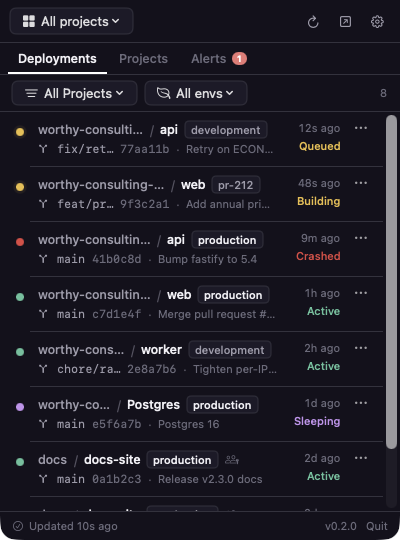
See everything you can reach
Recent deployments across all projects — your workspaces and projects shared with you from other teams. Switch scope, filter by project or environment, hide PR environments.
-
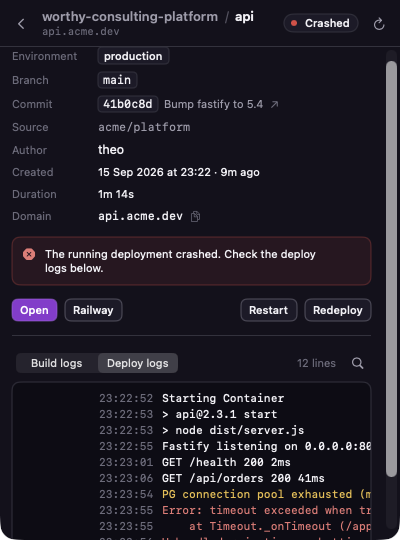
Read the logs, both kinds
Build logs follow along while an image builds. Flip to deploy logs to see what a running service prints — or the last lines before it died. Search either.
-
Get woken up
Native macOS notifications when a build fails, a running service crashes, or a deploy goes live (optionally production only). An Alerts tab keeps the history. Polled and diffed locally — nothing about your account leaves the machine.
-
Fix it from the menu bar
Cancel a build in flight · Restart a crashed service · Redeploy from the same source · Roll back · Approve a waiting deployment. Every one behind a confirmation.
-
Know what it costs
This billing period's usage — vCPU-hours, GB-hours, egress — with a dollar figure so far and Railway's month-end estimate, right on the Projects tab. Plus every service's custom and Railway domains, one click to open or copy.
-
Stay private
App-sandboxed. No analytics, no crash reporting, no account of ours. Your token stays in the macOS Keychain; requests go straight to backboard.railway.com.
Install
Two commands, or one drag.
brew trust mberrishdev/tap && brew install --cask mberrishdev/tap/railway-bar
trust is required once for third-party taps on current Homebrew. Upgrades: brew upgrade railway-bar. Add --no-quarantine to skip the first-launch prompt.
Open it, drag Railway Bar to Applications. Every version with its SHA-256 is on the releases page; verify with shasum -a 256 ~/Downloads/RailwayBar.dmg.
The app isn't notarized with Apple yet, so the first open shows "Apple could not verify Railway Bar is free of malware". Click Done, then either:
A. System Settings → Privacy & Security → scroll down → Open Anyway.
xattr -d com.apple.quarantine "/Applications/Railway Bar.app"
B. That command clears the "downloaded from the internet" flag on this one app only. Gatekeeper stays on for everything else — never run spctl --master-disable.
- Open the app and find the in your menu bar.
- Paste a token from railway.com/account/tokens — account or workspace. It's checked against the API before it's stored.
- Done. Deployments load, polling starts, macOS asks once whether it may notify you.
Questions
Short answers.
- Is this made by Railway?
- No. It's an independent project by mberrishdev. Railway Corp. didn't build it, doesn't endorse it, and won't support it — reach the maintainer at mberrishdev.me or @mberrishdev. "Railway" and its logo are trademarks of Railway Corp.
- Does it show projects shared with me?
- Yes. Besides your own workspaces it lists every project you're a member of in other people's workspaces, under "Shared with you" — or all together in "All projects".
- How accurate is the cost figure?
- It multiplies Railway's usage metrics for the billing period by Railway's public rates. Treat it as an estimate — credits, plan minimums and discounts show up only on your Railway invoice.
- What can it do with my account?
- Exactly what your token allows. An account token sees all your workspaces; a workspace token is limited to one. Cancel, restart, redeploy and rollback need member-level access. Revoke the token any time on Railway.
- How do alerts work without a server?
- It polls Railway's GraphQL API on an interval you choose (15 s – 5 min), one query per check, and diffs deployment statuses locally. It backs off automatically when rate-limited.
- Why does macOS warn about malware?
- Because the build isn't notarized with Apple yet — a statement about paperwork, not behaviour. See First launch for the two safe, app-scoped ways past it. Notarization is planned.
- Does it support "Login with Railway"?
- The OAuth flow is built in (Railway's native-app PKCE flow, no client secret), but the shipped build uses API tokens, which need no app registration.
- What's next?
- Variables, domains, volumes, usage and billing, environment management, template deploys. Want one sooner? Tell the maintainer.
Put Railway in your menu bar.
Free, no account, no upsell. If it saves you a tab a day, buy me a coffee.